I'm preparing for a conversation with linkarzu.
It would be fun to quote snippets from some of the other videos he has.
I like the way he does a lot of reaction videos that build on what people have shared.
He tends to listen to things at 1.25 or 1.5x speed.
I'm not sure if I have the patience even for that,
so it'd be nice to be able to just quickly skim the text.
He also clips a lot of his own videos.
It might be interesting to play around with my workflows for listening to snippets and clipping them.
I've grabbed YouTube captions and reformatted them before:
This time around, I want to get the VTT format so that I can possibly use them with subed-record to clip audio or video.
From a YouTube link, I want to run a single command that gets me a VTT file with that as the media source and with the captions.
If there are any chapters in the description, it would be lovely to get them too. I can get them from the JSON, yay!
Now I can use M-x sacha-subed-youtube to open the VTT file, which is cached locally, and I can use M-x sacha-subed-youtube-region-as-quote after selecting a section. Well, actually, I have an Embark command s (for "subed") that I can run on a YouTube video link and a selected-mode shortcut for y that I can run when the region is selected. Results:
00:09:46: I think the value of Org is that it is in the context of Emacs, which can now do other things. It can be your email client. It can be your agenda. Of course, it can be your programming environment. All these sorts of things, like your RSS feed reader and so on. And in the context of all that, you also have Org. So for me, that's kind of the value. But otherwise, having Org elsewhere, it's great still, because the paradigm of Org, I think, is a portable paradigm.
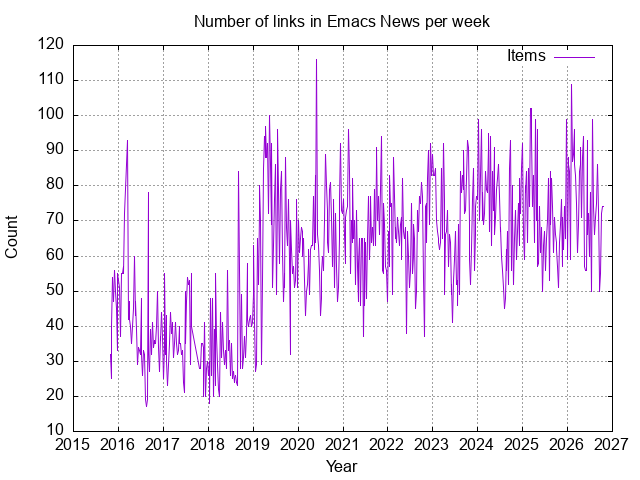
While summarizing my history with Emacs, I was curious about just how many Emacs News posts I've written and how many links I've highlighted. 564 posts, > 34000 items, an average of 60 items per posts.
Analysis: It turned out that my emacs-news/index.org only went back to about 2016,
missing a few months of 2015.
To fill in the data, I needed to convert the old HTML files into Org format.
Then I inserted the old entries into my file.
insert-file-contents doesn't seem to move the point, but if I narrow to my Posts subtree (org-narrow-to-subtree), then I can go to the end of the narrowed part.
settitle"Number of links in Emacs News per week"set xdata time
set timefmt "%Y-%m-%d"set format x "%Y"set xlabel "Year"set ylabel "Count"set grid
plot data using 1:2 withlinestitle"Items"
This probably tracks my availability more than anything else. The dip in 2017 and 2018 corresponds pretty well to the time that the kiddo needed more of my attention. Babies sleep a lot; toddlers, not so much.
I generally feel that there are so many interesting rabbit holes to go down each week,
and the Emacs community is active enough that there's always one or two things I want to add to my to-do list to explore further.
Putting together Emacs News is one of the highlights of my week. It takes me about 1 - 2 hours,
and some of that is just because I get distracted trying out the cool stuff I come across.
Learning from similar newsletters: OCaml Weekly News has a single author as well and does a lot more summarization, but includes fewer links.
This Week in Rust is a similar link-dump weekly newsletter.
It's written by a larger team and it has more commentary.
I think that for the Emacs community, I'm still leaning towards this large list of categorized links for easy skimming.
As I get the hang of writing more, I'd like to write more blog posts myself that Emacs News can also link to.
If your community doesn't already have a weekly or monthly newsletter, I highly recommend it as a way to bring the community together.
: Added more notes based on topics in the description
: Ha, I accidentally left in some raw transcription output. Serves me right for not scrolling down.
Also, I've added a summary image.
I'm going to be chatting with linkarzu about Emacs and life.
He's more of a Vim person than an Emacs person, so I'll try to share things that are generally useful. He's called it: "Why Sacha Chua Still Lives in Emacs After 20+ Years."
I am not sure my eyebrows have ever done that, but linkarzu does like his AI-generated thumbnails, so we'll let that pass. =)
(America/Toronto, -0400) = Thu Oct 29 0800H EDT / 0700H CDT / 0600H MDT / 0500H PDT / 1200H UTC / 1300H CET / 1400H EET / 1730H IST / 2000H +08 / 2100H JST
His description:
Sacha Chua joins me to talk about Emacs. She has been living in it for
decades, and she shares the Emacs world with all of us through Emacs News,
Emacs Chat and EmacsConf.
I want to see how she runs her life in Org Mode and how she uses her speech and audio braindump workflows, and to ask her what she thinks of what Prot and I have been doing with Emacs.
We'll also be discussing Neovim and other usual tech related topics
As a backup and so that it shows up on my YouTube feed, it's also going to be streamed at:
(but watch it on his channel instead for the stats boost!)
Note: Both videos will become unlisted afterwards. I think that means you'll still be able to reach it from my blog post or from a direct link, but you won't see it on his channel or mine, at least until he posts the edited video publicly. Also, to encourage people to sign up for his memberships (and to keep things more focused during the conversation), Linkarzu limits chat during the livestream to members of his channel. That's totally fine, he's allowed to experiment with ways to make a living, so please don't give him any grief about it. =) If you have any questions about what we talk about, or would like to continue the conversation, feel free to leave a comment or email me at sacha@sachachua.com and I will check it afterwards.
I like making things available and searchable long-term.
I plan to post the transcript of either the full conversation or excerpts of it on my blog, and I'll probably also post screenshots or clips of the video or audio where it makes sense.
It might be something like the transcript I posted in Chatted with John Wiegley and Karthik Chikmagalur about personal information management.
I am looking forward to learning more about the NeoVim community.
I think the NeoVim community does the YouTube thing really well, and
I'm hoping that the new org.nvim stuff might encourage people to do
more literate programming and blogging.
I put together some notes on my Emacs history, building on from the
title that Linkarzu put on his event ("Why Sacha Chua Still Lives in
Emacs After 20+ Years").
I'll probably add a little bit more over the next two days.
I am more curious about where the conversation can take us rather than
switching into presentation mode, since I can write blog posts and
make videos whenever I want. =)
I put together some sketches to help me organize my thoughts.
His channel uses dark mode, so let's experiment with dark mode in my sketches too.
I want to think about things so that the relevant resources are readily available and so that I can express myself more concisely.
I can put together a presentation or write a blog post by myself, so I'm more curious about the kinds of things he wants to explore in the conversation.
I'll probably need to do a brief introduction to set the context
so that people know where I'm coming from.
Let's disclaim my professional irrelevance up front.
Capture into an inbox on my computer or on my phone (Orgzly Revived + Syncthing),
Agenda on either Orgzly or my computer.
Several large files that I add a lot of ideas to and slowly chip away at when I have time. I'm still the primary parent for our ten-year-old. Although I have a little bit more focus time now that she (usually) attends virtual school, I still find myself capturing ideas and knowing that I will get to them maybe sometime over the next few years.
It's a lot of fun to be able to make tiny improvements that add up.
Speech and audio brain dump workflow
On my computer
I use dictation to quickly grab some snippets.
I can put each sentence on its own line and then use Org Mode to move things around.
could demo: fill paragraph cycling, one sentence per line, paragraph mode,
For more complicated things, then I'll use Org Mode outlines or maybe start with some kind of sketch.
I also type too. It's nice to have that option, especially when there's code.
Let's start with a summary so that we don't worry about running out of time and so that people don't have to listen to two hours before getting to the good stuff.
I want people to be able to get something out of this, whether they're a Vim diehard or experimenting with Helix, or even if they're passionate about things other than text editors.
Here are some of the things I'm learning about that I think are important.
Fortunately, we have a strong culture of sharing, starting with the GNU General Public License and continuing through things like literate programming. We have mailing lists, blog posts, videos, meetups, and conferences. One of the best ways to learn Emacs is to learn out loud. Another way is to look over someone's shoulder. It doesn't take a lot of time or money to do the kinds of things that I enjoy doing to connect the Emacs community, and I'd love to see other tech communities experiment with things like that too.
Adaptability: You can customize Emacs to really fit the way you want to work. The more people do this, the easier it gets to adapt Emacs to even more workflows.
Incremental improvements: Even small changes add up, and code turns out to be surprisingly reusable. It often pays off beyond the recommendations of xkcd: Is It Worth the Time?.
Imagination and play: Tweaking Emacs can be lots of fun. Fun is important.
Quick notes on the stuff he mentioned in the description:
How I run my life in Org Mode
Capture into an inbox on my computer or on my phone (Orgzly Revived + Syncthing),
Agenda on either Orgzly or my computer.
Several large files that I add a lot of ideas to and slowly chip away at when I have time. I'm still the primary parent for our ten-year-old. Although I have a little bit more focus time now that she (usually) attends virtual school, I still find myself capturing ideas and knowing that I will get to them maybe sometime over the next few years.
It's a lot of fun to be able to make tiny improvements that add up.
Speech and audio brain dump workflow
On my computer
I use dictation to quickly grab some snippets.
I can put each sentence on its own line and then use Org Mode to move things around.
For more complicated things, then I'll use Org Mode outlines or maybe start with some kind of sketch.
I also type too. It's nice to have that option, especially when there's code.
The details are a little bit fuzzy, but fortunately I've written about some things in previous blog posts. I'd like to flesh this out with an outline and maybe even some sentences or paragraphs later on.
I love the way that different themes recur. I find myself building on things that I started exploring years ago.
For example, my current interest in hybrid speech interfaces echoes all the way back to M-x doctor and Emacspeak from the beginning.
M-x doctor:
From "Unix Power Tools":
If you have time to waste (and I mean really waste), Emacs has things to keep you occupied. … If you think you might be in need of a psychotherapist, save your money and try ESC-x doctor RETURN.
I was not actually looking for a psychotherapist.
I think I was seventeen or eighteen, and I was trying to go through all the interesting computer science books in my university's library in the Philippines. I thought it was funny that someone put in that kind of Easter egg. The more I dug around in the source code, the more I was amazed by the things that people had added to Emacs. Anyway, it's interesting how the fun, inconsequential stuff turned out to be the thing that caught my attention.
I loved seeing how people customized Emacs in so many different ways to fit the way that their particular brain worked, and getting it to fit my brain too.
One time, when I was the maintainer of Planner Mode, I got an email from someone who said something like: "Thank you for maintaining this. By the way, one of your recent changes lost my data and I didn't have any backups, but that's okay, just please fix it, here are some ideas." That kindness mattered a lot to me.
Emacspeak:
In my third or fourth year of university, my laptop screen started glitching. Sometimes it got really low in brightness and contrast, and you could only read it if you tilted it at an extreme angle and looked very carefully. But the Emacspeak folks had figured out how to make it perfectly usable just with speech synthesis, because they needed that as blind or visually impaired users. This turned out to be pretty handy. I not only used that for a fair chunk of my regular writing and coding, but also for my experiments with wearable computing, and for the occasional alert when I was paying attention to something else. Speech synthesis was a lot more discreet than the head-mounted display that I experimented with in 2003.
flashcard.el:
The fun part about this was rigging up my flashcard.el so that it would show me funny cat pictures from ICanHasCheezburger when I answered enough questions correctly. Fun matters.
I started using Org Mode as part of research for a book on Emacs. I didn't finish the book, but I stuck with Org Mode. I like the way it fits the way I think and what I want to do.
Work: Drupal, Rails, blogging, data analysis, literate programming
I helped organize the first one in 2013 in London.
I watched the 2015 one remotely.
Amin Bandali reached out to me in 2019 to get EmacsConf going again, and we've been organizing it yearly since.
The kiddo wanted to play Minecraft, but she wasn't comfortable enough with typing yet, so I made her some command books so that she could just click on things in order to teleport back to us or give herself equipment. Now she can type very quickly, but it was helpful back then.
linkarzu mentioned wanting to talk about artificial intelligence.
I don't know nearly as much as lots of other people do.
Maybe I can just share the things that I've been experimenting with, and also what I care about from a community perspective.
I would like to help figure out how to deal with this turbulence and come out the other side happier.
I write really well. I have very good grammatical skills, for the most part, when I’m typing. But when I speak, I don’t speak like that. My grammar is not very good. I say words out of order a lot. I have filler words. And I say things that don’t make any sense.
This is totally me too!
It's one of the reasons why I want to get used to dictation, because it'll give me a lot more practice in saying things, which can only help when I'm making videos or talking to people.
While I’m talking, the text that’s outputted has no punctuation or paragraphs or anything like that.
Oh yeah, no, that's mostly a matter of picking the right speech recognition engine.
For example, I'm using a local instance of Orukeet, and it seems to do a reasonable job of dividing my thoughts into properly-capitalized and punctuated sentences in both English and French.
In fact, I have some code in Emacs that wraps it to one sentence per line (as part of sacha-whisper-insert which uses sachac/whisper.el).
This allows me to use Org shortcuts to move lines around in order to reorganize them into something that makes more sense.
Some people use large language models to clean up raw transcripts and remove false starts or filler words.
I don't quite trust large language models to leave my wording alone.
I have some code that uses replace-regexp-in-string to take out some of my filler words and fix commonly misrecognized words that I've saved with substitute.el.
I'm not sure if I was ever any good at multitasking, but nowadays at 43 years old, I find that talking and typing at the same time has gotten a little bit harder for me.
I type much more slowly if I want to narrate things at the same time,
like when I'm recording a video or live streaming.
When I'm just thinking on my own, I type quickly enough that my computer sometimes jumbles the keystrokes up because it doesn't handle keyboard interrupts well when it's busy.
It's not just my fingers; it sometimes happens even when I was trying to use wdotool to simulate typing.
Speech recognition is surprisingly reliable, even though I have to correct it from time to time.
The broad strokes are there, and I save the recordings so that I can fix misrecognized words.
I also love the way that speech recognition opens up so many more possibilities
for commands I would never be able to memorize keyboard shortcuts for. "Remind me today to…" is now one of my favourite ways to capture an Org Mode task.
Besides, I think it's a good idea to plan ahead just in case I can't type very well in the future. All sorts of things can happen: accidents, disease, old age.
I wrote about that a bit more in Emacs Carnival Oct 2026: Exploring keys and voice input in Emacs.
All that to say: exciting times ahead.
I think it would be pretty amazing if this sort of thing allows more people to write and share.
Looking forward to reading (and possibly listening to) what people have been learning about!
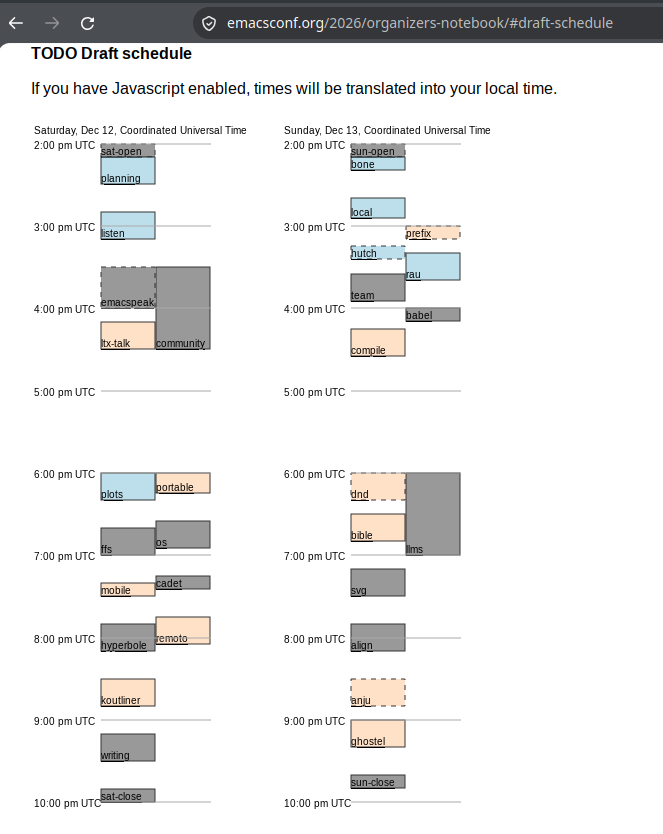
Nudged by Ihor Radchenko's suggestion, I added some JavaScript to translate the graphical SVG schedule on the EmacsConf wiki to your local time zone.
I'll post the schedule on the wiki next week, but in the meantime, you can take a look at the draft schedule in the organizers' notebook.
Let me test it by setting my local time zone to UTC with sudo timedatectl set-timezone Etc/UTC…
Figure 1: Screenshot of the draft schedule in the wiki, showing times dynamically translated to UTC
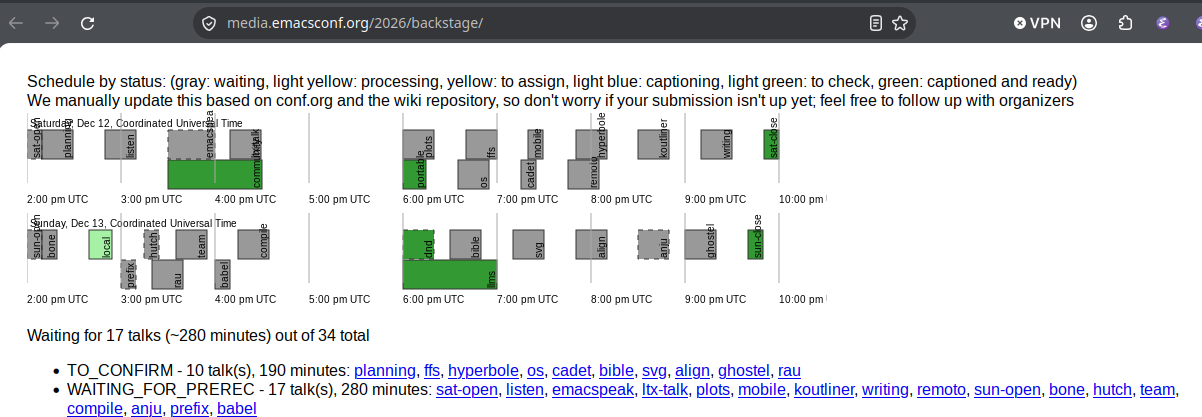
Here's the horizontal view in our backstage index, showing the status of talks so far.
Figure 2: Screenshot of backstage view, showing times dynamically translated to UTC
I still need to make sure that my time zone is set to America/Toronto when I'm generating the SVGs, but at least now people can see the times translated to their local time zone.